
Anime Star Eye Trend: How to Make the Photo (2026 Guide)
What the anime star eye trend is, which selfie works best, how star, heart and manga styles differ, and how to create your own 2K photo in a few minutes.
Last updated: 2026-10-25
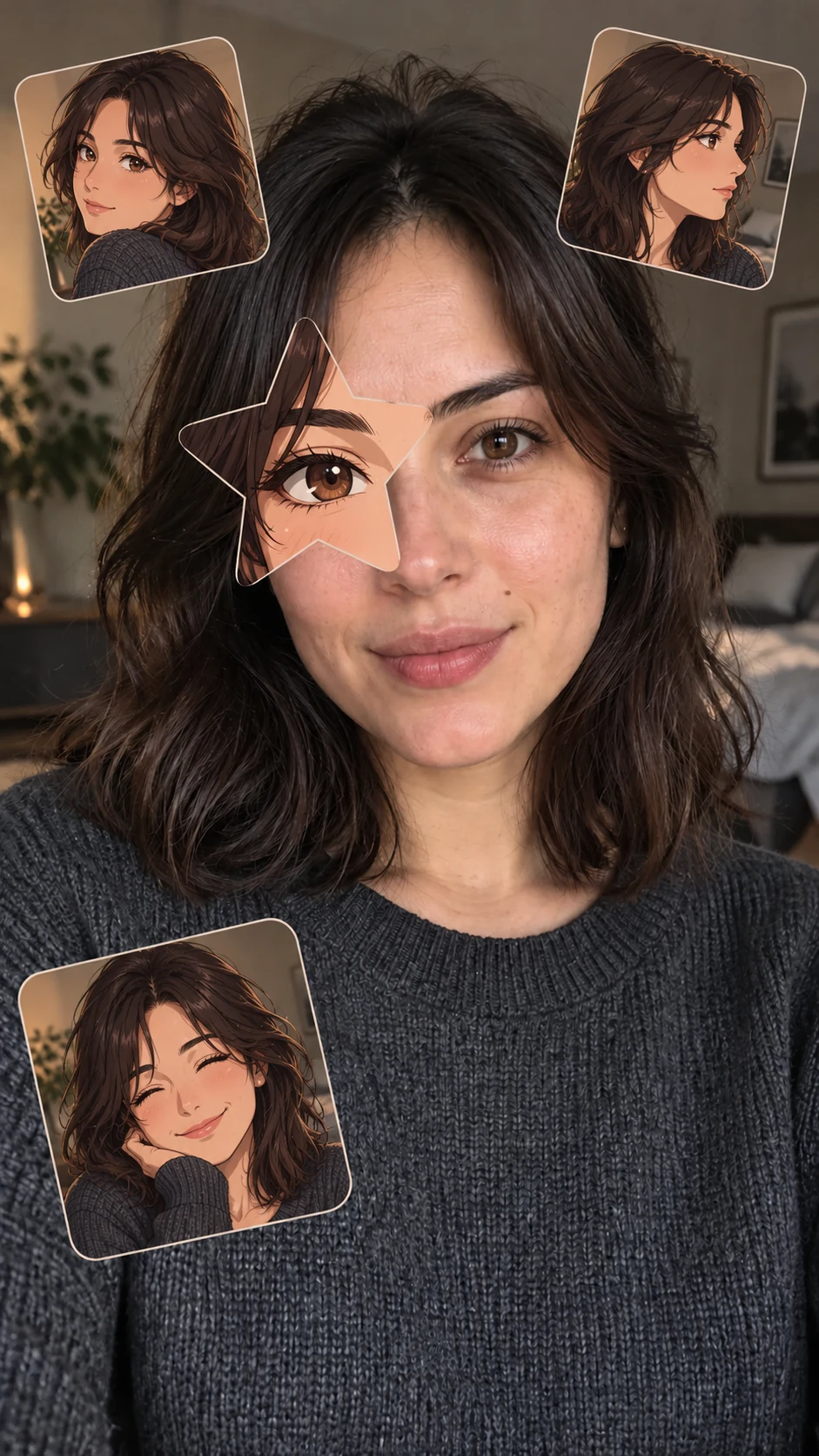
The anime star eye trend mixes a real selfie with a little bit of anime. One of your eyes is covered by a star-shaped cutout, and inside that star is an anime version of the same eye. Around you sit a few small stickers of your anime twin: an original character drawn from your own hair, outfit and features. The rest of the photo stays real.
Why the look works
The effect lands because it keeps almost everything real. Your face, skin texture, lighting and background stay untouched, so the single anime eye reads as a playful surprise instead of a filter. The stickers repeat your anime twin with different expressions, which makes the photo feel personal rather than generic. A vertical 9:16 frame makes it ready for Stories, Reels, TikTok and Xiaohongshu.
Choose the right selfie
The photo you start with matters more than anything else. These tips give the most accurate results:
- Face the camera. A front-facing or slightly angled head-and-shoulders shot works best.
- Keep one eye fully visible. The star is aligned to a real eye, so avoid hair, hands or sunglasses covering both eyes.
- Use soft, even light. Window light or overcast daylight beats harsh flash and deep shadows.
- Leave some space around you. A simple background gives the stickers room without covering your face.
- Go sharp and close. Blurry, low-resolution or distant faces lead to weaker matches.
- One adult only. Group photos, children and public figures are not supported.
Star, heart or manga?
| Style | What it looks like | Good for |
|---|---|---|
| Star eye | The classic five-pointed star with a full-colour anime eye | Trend posts and profile pictures |
| Heart eye | A softer heart-shaped cutout with the same anime twin | Couples, birthdays and cute posts |
| Manga | Black-and-white ink and screentones across the whole image | Moody, comic-panel aesthetics |
All three styles use the same selfie, so it is easy to try another look later.
How to make your photo
- Open Create photo and sign in.
- Pick Star eye, Heart eye or Manga.
- Upload one clear selfie (JPG, PNG or WebP, up to 10 MB) and confirm you have permission to use it.
- Create the photo. Each one uses 3 credits, and most are ready within a few minutes.
- Download the 2K vertical image from the result screen or from My photos.
If a photo cannot be created, or its result is blocked by our safety checks, the credits are returned automatically.
Privacy and safety
Your selfies and results are private to your account and are never placed in a public gallery. Uploads and results pass through automated safety checks before delivery. Only use adult portraits that you own or have permission to edit. Read the Privacy Policy for details on how images are processed.
Credits and plans
You can subscribe for fresh credits every month or year, or buy a one-time credit pack that never renews. Compare the options on the pricing page.
Tips for sharing
- Post the before and after side by side: the contrast is what people react to.
- Try the heart style for matching couple photos.
- Use the manga version as a profile picture; it stays readable at small sizes.
- Crop nothing: the 9:16 frame already fits Stories and phone wallpapers.